For Xero bookkeepers and finance teams
Unapprove approved invoices and bills, in bulk
Unapprove sends approved Xero invoices and bills back to draft in bulk. Xero cannot do that itself, so Unapprove makes a draft copy of each one you select, attachments included, then voids the original. You see every result before anything changes.
The preview writes nothing to Xero. 3 documents free. 14-day refund if unused.
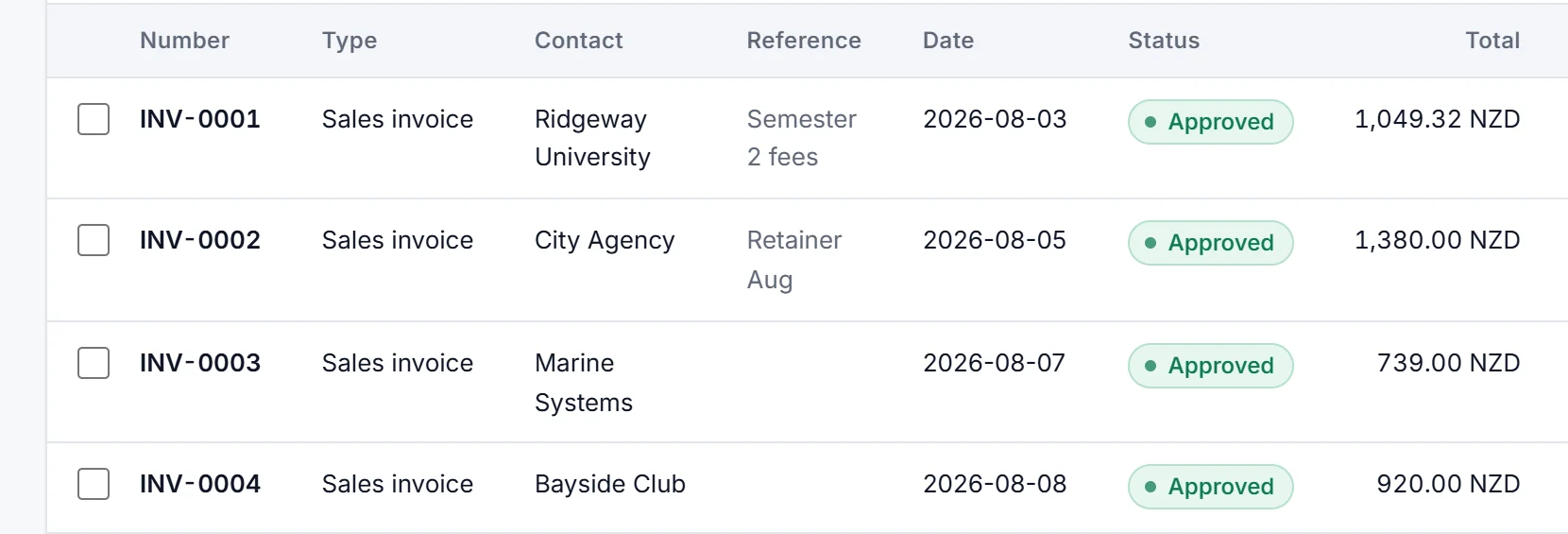
Before Four approved invoices that should be drafts
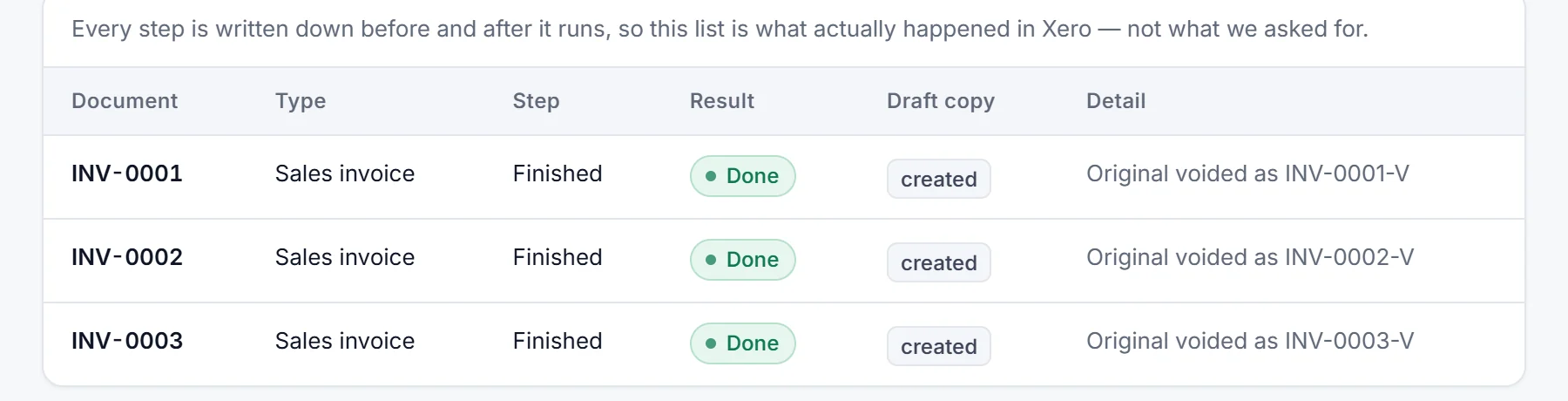
After Draft copies created, each original voided
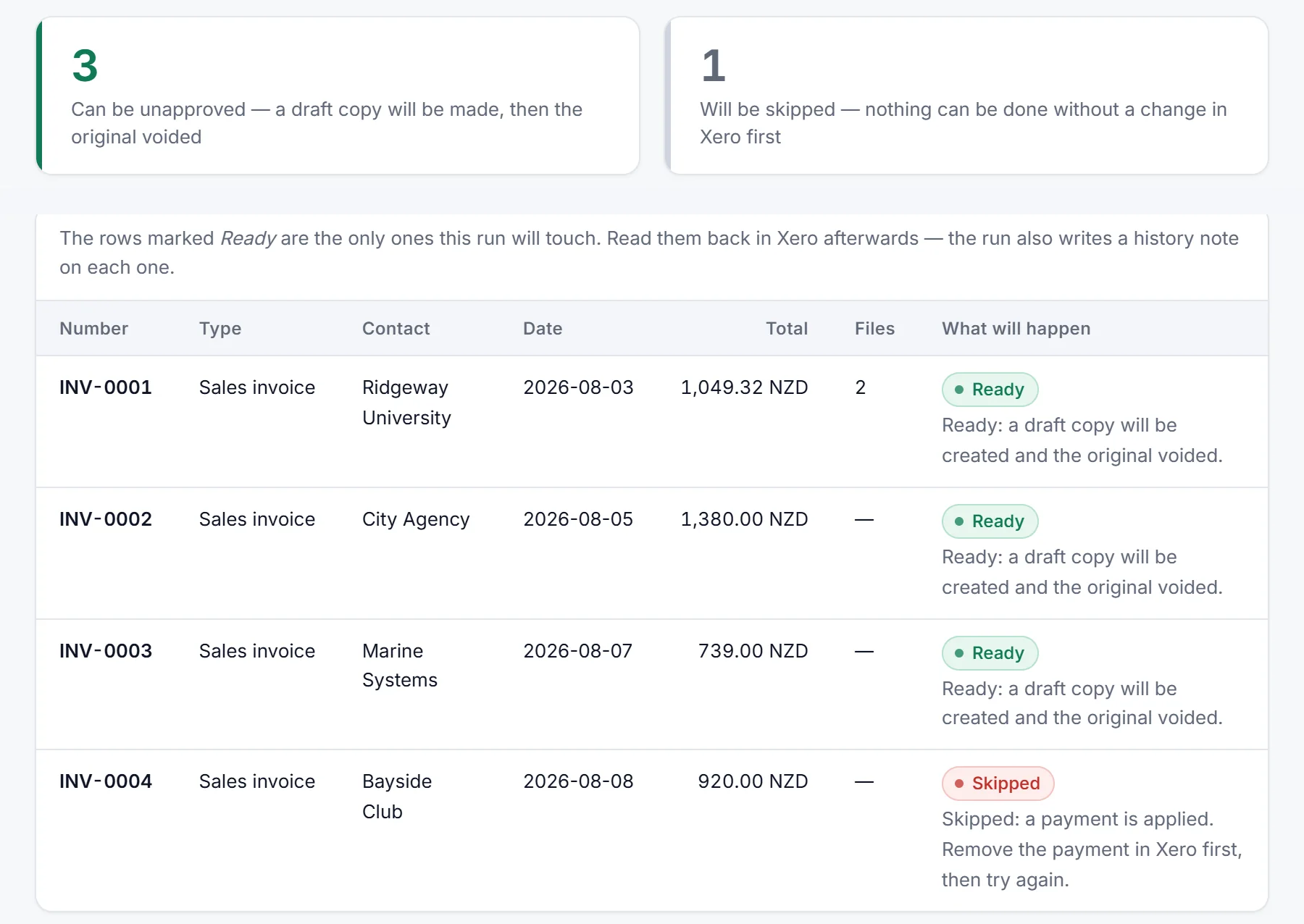
INV-0004SkippedA payment is applied, so the preview left it alone and nothing was changed.

US organisations: no draft copies; void and export only.
525 and 681 votes on Xero's own ideas board, to unapprove an invoice and to unapprove a bill. Xero has not built either (checked 12 November 2026).
1,329 files in 10 ZIPs in one customer's attachment export, no errors (confirmed 12 November 2026).
“I bought the one time pass and the software worked perfectly.”
Six steps per invoice by hand. One preview for the whole batch.
By hand, per invoice
- Remove any payment.
- Copy the invoice to a draft.
- Compare the copy: the tax setting and totals can change.
- Free the invoice number.
- Void the original.
- Restore the number, check the files, add a note.
With Unapprove, per batch
- Connect. Sign in on Xero's own page.
- Preview. See what happens to each document, and why any are skipped.
- Confirm. Type the count, for example
UNAPPROVE 37.
The same copy-then-void order, with checks on every step.
After the run: every document, its result, a CSV


- Order of work
- Draft copy first. If the copy fails, the original is left as it was.
- Numbers and files
- A sales invoice copy can take back its number, attachments come across, and each document's history points to the other.
- Skipped documents
- A payment, an allocated credit note, a locked period or an archived contact: listed with the reason, not guessed at.
- Export
- Attachments and invoice PDFs as dated ZIPs, read-only. 25 files free.
What it can touch, and what it keeps
- Sign-inYou approve access on Xero's own page. We never see your Xero password.
- PermissionsInvoices and attachments (read and write); contacts and settings (read only). Payments only if you switch on "Remove payments and void".
- FilesAttachments are never stored: they pass from Xero to the new draft. Document snapshots are deleted within 30 days.
- WhoBuilt and supported by Atesen Software. [email protected], answered within one business day.
- DataTokens and snapshots are encrypted at rest. Disconnect any time and the stored tokens are deleted. Privacy policy
Free to try. Then $39 a month, or from $49 once.
Preview as many documents as you like and process 3 for free. Then pick monthly (or annual, $290 a year) for regular clean-ups, or a 30-day pass for a one-off mess. Both include every run type and the attachment export. Prices in USD, excluding VAT / sales tax; Paddle adds any that applies at checkout.
Founding offer: 40% off your first subscription payment, or off the $49 pass, or off the $29 Export Pass, with code FOUNDING40 until 30 November 2026. Applied at checkout. The larger Clean-up Passes are sold at their list price.
See plans and pricesStart monthly, $39/monthClean-up Pass, $49 onceAnnual, $290/yearOr connect free
Payments by Paddle, the merchant of record. 14-day refund if unused: Refund policy. Atesen Software, [email protected]
Before you connect
What gets skipped?
What about invoices with payments?
Can a void be undone?
Bills as well as sales invoices?
Why not just edit the approved invoice?
Where is my data kept?
All 34 guides: doing it by hand in Xero, and when Unapprove helps
- How to unapprove multiple invoices
No unapprove button: the void, copy and re-attach routine, where it stops being practical, and running it on a whole batch.
- Bulk void approved invoices and bills, or delete drafts
Which documents can be deleted or voided in bulk, which only one at a time, and how to void a batch.
- Download all attachments and receipts
The one-file-at-a-time routes, what they leave out, and how to get every attachment as dated ZIP folders.
- Bulk unapprove bills
No unapprove for bills: when to edit instead, the manual route back to draft, and running it on a whole selection.
- Archive every receipt and attachment for record keeping
Why keep your own copy, what the Xero exports leave out, and how to get every file out with an index.
- Year-end clean-up checklist for duplicate and misposted invoices
Find duplicates and misposted lines before the lock date, then void or redo a large batch.
- Void paid invoices in bulk
Remove the payment, then void: the manual steps, what to check first, and doing it for a batch.
- Undo a bad CSV import of invoices
No undo button: delete the drafts, void or unapprove the approved ones, and what happens to the numbers.
- Write off many invoices and bad debts at once
The credit-note method, its tax and lock-date catches, and clearing a whole selection with an undo.
- Send invoices and bills from awaiting approval back to draft
What Xero offers for documents stuck in awaiting approval, and sending a batch back to draft.
- Invoice number already exists? Reuse the number of a voided invoice
Find which invoice holds the number, why a voided number stays used, the rename-first order, and keeping numbers across a batch.
- Should you void an invoice or issue a credit note? A guide for Xero users
Edit, void or credit: what Xero says for each case, and what can be done in bulk.
- Repeating invoices approved or sent by mistake
Fix the template first, then clear what it created, and why a sent email cannot be recalled.
- Duplicate invoices after a Shopify, Amazon, A2X or Link My Books sync
Why sales syncs post twice, removing the copies by hand, and voiding a whole batch of approved ones.
- Invoices posted twice after a migration or conversion
Conversion balances, open invoices that came across twice, and clearing the extra copies.
- Duplicate bills from Dext, Hubdoc or the bills inbox
Xero's duplicate bill review, where it stops with paid bills, and clearing a large batch.
- An app sent invoices or bills in as approved instead of draft
Change the app setting first, then take what it approved back to draft with the same numbers.
- Delete all invoices, or start over
No reset button: delete the drafts, void the approved ones, or start a new organisation.
- Move invoices entered in the wrong organisation
Export from one organisation, import into the other, carry the files across, void the originals.
- Wrong tax rate on approved invoices and bills
Edit, find and recode, credit note or return adjustment for a wrong VAT or GST rate, and redoing a batch as drafts.
- Wrong contact on an approved invoice or bill
What can be edited after approval or payment, what to do when Edit is blocked, and redoing a batch as drafts.
- Void an invoice that has a credit note allocated
Why the void is blocked, taking the allocation off by hand, what to do with the credit note, and doing it for a batch.
- POS daily sales posted twice
What Square, Lightspeed, Zettle, Epos Now and SumUp say they post, how a day goes in twice, and how to void the copies.
- Redo a migration whose open invoices and bills landed as approved
Why migrated documents arrive approved, what the conversion balances need, the manual redo, and redoing a batch with the same numbers.
- Export receipts and supporting documents for an audit
What Xero exports for an auditor, what it leaves out, and pulling every attached file for a period with a manifest.
- Move bills back to draft, whatever their status
Awaiting approval, approved or paid: which way back to draft applies, what Xero offers, and moving a batch.
- Delete or void a bill
Delete drafts, void approved bills, take the payment off a paid one first, and void a batch of paid bills.
- Delete a payment on an invoice or bill
Remove & Redo step by step, unreconcile or delete, batch payments, and removing payments before a void.
- How to allocate a credit note
The Allocate Credit steps for customers and suppliers, why the option goes missing, and undoing a wrong allocation.
- Add attachments to many invoices at once
One PDF per invoice, added by hand or from a folder named by invoice number, with a preview and exact matches only.
- Unapprove multiple sales invoices, step by step
The void, copy and re-attach steps for sales invoices, one at a time, and where that runs out.
- Revert approved bills to draft
Edit first, then copy, void and re-attach; bills can be voided in bulk, the rest is manual.
- Bulk void vs unapprove
Void or unapprove: what each does, what Xero does in bulk, and how to choose.
- Fix wrong approved invoices after bank reconciliation
Unreconcile or remove the payment, fix or replace the invoice, reconcile again.
Two more tools on the same connection
- Duplicate FinderLists invoices and bills in Xero that share a contact, total and date or reference. The scan only reads; void the extras in bulk. Find duplicate invoices and bills
- Bulk Invoice PDF DownloadSaves Xero sales invoices as one PDF each, named by invoice number, in ZIPs. Counting and downloading only read. Download invoice PDFs in bulk
Missing receipts instead? ReceiptHollow, a sister product by Atesen Software, lists Xero bills and spend transactions with no attachment. It only reads, and the first scan of up to 50 is free.
See the result before anything changes
Start free previewTalk to a human first
By connecting, you agree to the Terms of service and the Privacy policy.